Janitor AI's new My Chats layout: where things moved, deleting chats, and the AI summaries
Janitor AI redesigned My Chats on web. Where things moved, how to delete chats now, whether the AI chat summaries can be switched off, and the privacy angle.
Built from the product's official documentation, pricing and policy pages, not from our own hands-on use. How we review
Key facts at a glance
| App | Price (USD, date checked) | Free tier | Age | Best for |
|---|---|---|---|---|
| Candy AI | From $3.99/month on the 12-month plan (billed $47.88); 1 month $13.99 (checked 26 October 2026, source) | About 5 messages (Terms of Service) | 18+ | All-round companion with chat, images and voice |
| SpicyChat | $5.95, $19.95 or $29.95 a month (from 8 Sep 2026) (checked 22 October 2026, source) | Yes, no published message cap | 18+ content | Budget text roleplay with a large character library |
| Janitor AI | Chat free; janitor+ $12.99 a month or $99.00 a year (checked 26 October 2026, source) | Yes, chatting is free | 18+ | Free open-ended roleplay |
Prices change and can differ by country and currency; the official page is the final word. App names marked with a partner programme are affiliate links. "Best for" summarises the published features and user reports in our guides, not our own tests.
Adults only. Janitor AI is an 18+ platform under its own terms, and the apps named near the end of this guide are for adults too. Some links there are affiliate links, marked as such. The guide itself is non-explicit.
How this guide was made. This is a documentation-based guide. The steps come from Janitor AI’s own changelog, read on 27 October 2026. What people like and dislike comes from the megathread on r/JanitorAI_Official, read on 26 October, and is attributed to them. We did not log in to Janitor AI to check the new layout ourselves.
What changed, according to Janitor
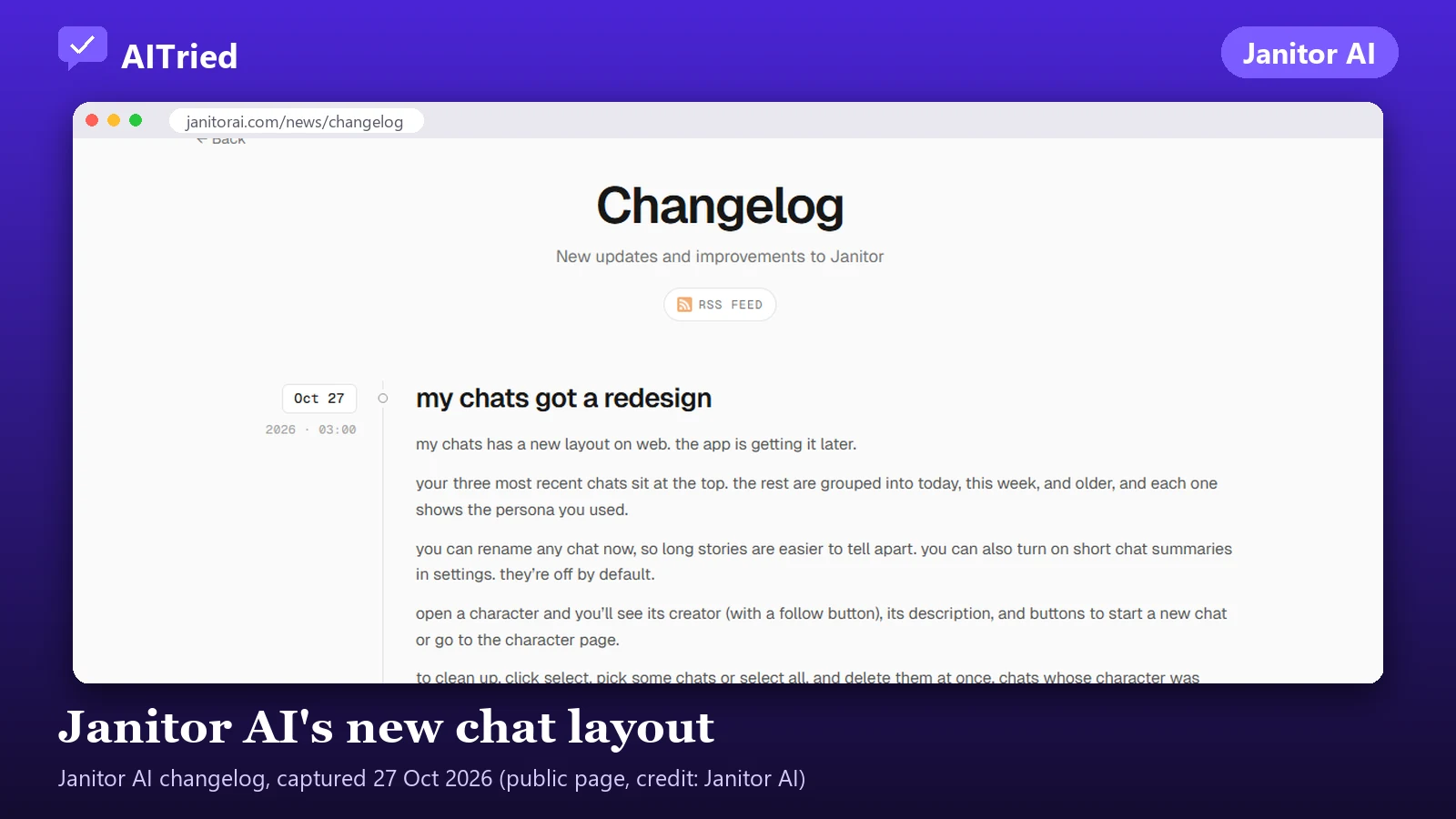
The change showed up for users on 25 October 2026. Janitor’s changelog explained it in an entry dated 27 October, titled “my chats got a redesign”. It applies to the website first; the changelog says “the app is getting it later”. In short:
| Before | Now (web) |
|---|---|
| One long list of chats | Your three most recent chats at the top; the rest grouped into Today, This week and Older |
| Persona picture on each chat | Each chat shows the persona you used |
| No way to name a chat | You can rename any chat |
| Preview text on each chat | Short chat summaries, which you turn on in settings; “they’re off by default” |
| Not described in the changelog | Open a character to see its creator (with a follow button), its description, and buttons to start a new chat or go to the character page |
| Deleting one chat at a time | Click Select, pick chats or Select all, and delete them at once |
| Red marks on removed characters | Chats whose character was deleted or taken down now say so |
How to delete chats now
On the web, per the changelog:
- Open My Chats.
- Click Select.
- Tick the chats you want to remove, or use Select all.
- Delete them together.
Users in the megathread split on this. One said “we now have to mark the chats in order to delete them”, an extra step for a single chat. Another liked that “you can select multiple chats and delete them all at once”. Both are describing the same change: deleting one chat takes one more click, deleting twenty takes far fewer.
Two things worth knowing before you clear out old chats:
- Deleting is for good. Nothing we read describes a recycle bin for chats. If a story matters, copy it out first.
- Deleting messages no longer wipes memory. After a bug in August, Janitor’s changelog (20 August 2026) says deleting messages “doesn’t touch your memory anymore, ever, unless you specifically choose to clear it.”
If you are on the mobile app, the changelog says the new layout comes later, so the old delete route may still apply there for now.
Telling your chats apart again
This was the loudest complaint. Many users said they had been using the old preview, often the start of their chat memory, as a label. One wrote, “I named my chats on the beginning of the summary and now I genuinely can’t tell them apart.” Others with several personas of the same name lost the picture that told them which was which.
What the new layout offers instead:
- Rename the chat. The changelog says “you can rename any chat now, so long stories are easier to tell apart.” For people who run several stories with the same bot, this is the direct replacement for labelling chats through memory text.
- Check the persona name shown on each chat. If two personas share a name, consider renaming one, or put the persona in the chat name.
- Use the time groups. Today, This week and Older narrow the search if you remember roughly when you last played a story.
Users asked for chat folders and a way to switch back to the old layout. Neither is in the changelog.
The AI summaries: can you switch them off?
Here the official account and the user reports differ, so it is worth being precise.
What users reported on 25 October. In the megathread, users said the chat list showed AI-written summaries of their chats. Several called them inaccurate (“Not a single one of the AI-generated summaries was accurate”), one said they showed things “I never put into the chat memory”, and others found the idea uncomfortable: “why in the hell did they think having an ai read and summarize our chats without consent would be a good idea? and no way to turn it off?” One user wondered whether the summaries would be fed back into the bot’s memory.
What Janitor’s changelog says on 27 October. “You can also turn on short chat summaries in settings. They’re off by default.”
We cannot tell from the outside whether the summaries were on for everyone at first and then switched to opt-in, or whether some accounts saw a test. Either way, the current official position is that they are optional and off unless you choose them. So:
- If you do not see summaries, nothing to do.
- If you still see them, reload the page (a hard refresh: Ctrl+F5 on Windows, Cmd+Shift+R on a Mac), then look in settings for a chat summaries option and make sure it is off. We could not confirm the exact name or place of the setting.
- If it is still on with no option, report it to Janitor support from the help centre; that would contradict the changelog.
Summaries are not the same as chat memory
Janitor has had a separate summarising feature in chat memory since before this change. After an experiment leaked to everyone in August 2026, the changelog of 19 August says auto-summarising of memory “can only run when you’ve turned on memory replaces old messages, and it has its own off switch next to it”, in the chat memory panel. The default, it says, is the way it worked before. If you are worried about the bot learning from a summary, that memory panel is the place to check, not the chat list.
The privacy angle
The summaries are a reminder of something that was already true: your chats are processed by software on Janitor’s side to produce replies, and now also to produce a one-line description of each chat. What the official pages do and do not tell you:
- Who writes the summaries: the changelog does not say which model generates them, or whether a summary is produced if you use a third-party model through a proxy.
- Who sees them: nothing we read suggests anyone but you. They appear in your own My Chats list. Janitor does let you publish a chat deliberately (public chats, March 2026); a published chat is a separate, opt-in step.
- What Janitor says about chat data: its safety page says it will never sell personal data or share private conversations with third parties for advertising or commercial purposes. Our full read of its privacy policy, proxies and age checks is in is Janitor AI safe?.
Practical steps: keep summaries off if you stream, share your screen or post screenshots, since the chat list now shows a persona name and, with summaries on, a line about each story. If you want a chat gone, delete it rather than relying on it being hidden. To leave entirely, the privacy policy’s route is Settings, Security, Delete Account, with a grace period before permanent deletion.
If the site itself is misbehaving
Some reports in the thread, such as the layout being “even WORSE on Mobile Website Mode”, may be teething problems rather than design. If pages will not load, chats error or the new layout looks broken, see Janitor AI not working for the checks that separate a Janitor problem from your browser or proxy.
If you have had enough of redesigns (adults)
Most people in the megathread were annoyed, not leaving. If you are weighing a move, compare by what you use Janitor for:
- A big community library: SpicyChat. It is an adult, NSFW-first platform with user-made characters, and its free tier has no published message cap. Try SpicyChat (affiliate link).
- One companion you design yourself: Candy AI. It is built around a character you create rather than a library. Paid plans start at $3.99 a month on the 12-month plan (checked 26 October 2026). Create a companion on Candy AI (affiliate link).
Every hosted app redesigns from time to time; none of them promises a layout. Our Janitor AI alternatives guide compares the options on memory, price and filters.
What we could not confirm
- The exact name and place of the summaries setting. The changelog says “settings” only.
- Why users saw summaries with no off switch on 25 October while the changelog of 27 October says they are off by default.
- Which model writes the summaries, and whether summaries are made for proxy chats.
- When the mobile app gets the new layout. The changelog says “later”.
Frequently asked questions
How do I delete chats on Janitor AI now?
On the redesigned My Chats page on the web, click Select, tick the chats you want (or Select all), then delete them at once. That is the route in Janitor's changelog of 27 October 2026. The mobile app gets the new layout later, so it may still work the old way.
Can I turn off the AI chat summaries on Janitor AI?
According to Janitor's 27 October 2026 changelog, yes: short chat summaries are something you turn on in settings, and they are off by default. Users who saw the change on 25 October reported summaries with no off switch, so it may have changed since. If you still see summaries, look in settings for the chat summaries option and reload the page. We could not confirm the exact name or location of the setting.
Where did the persona pictures go?
Users on r/JanitorAI_Official reported on 25 October that persona pictures were removed from the chat list. The 27 October changelog says each chat now shows the persona you used, by name. If you have several personas with the same name, renaming the chat is the workaround until something changes.
Do the chat summaries go into the bot's memory?
Nothing official says they do. The changelog describes the list summaries as a display option. Chat memory is a separate panel; since August 2026 its auto-summarising only runs if you turn on 'memory replaces old messages', and it has its own off switch next to that toggle.
Are my chat summaries visible to other people?
Nothing we read says so; the summaries appear in your own My Chats list. Janitor does let you publish a chat on purpose (public chats, March 2026), so check a chat is not published if you are unsure, and keep summaries off if you share your screen or screenshots.
What changed in this guide
- First published
Sources
Product details can change. These are the pages this article relies on, with the date each was checked.
- Janitor AI Newsroom: Changelog (entry 'my chats got a redesign', 27 October 2026; chat memory entries of 19 and 20 August 2026) (janitorai.com) Accessed 27 October 2026
- Janitor AI Newsroom: posts (public chats, 31 March 2026) (janitorai.com) Accessed 27 October 2026
- Janitor AI Help: Chat Memory & Context Management (help.janitorai.com) Accessed 27 October 2026
- Janitor AI: Safety at Janitor (janitorai.com) Accessed 18 October 2026
- Janitor AI Privacy Policy (last updated 17 September 2026) (janitorai.com) Accessed 18 October 2026
- r/JanitorAI_Official: Did they change again the UI? (megathread on the UI change, 25 October 2026) (reddit.com) Accessed 26 October 2026